If you’ve spent any time in academic research or HPC, you’ve probably used Slurm. There’s a reason it runs on more than half of the Top 500 supercomputers: it’s time- and battle-tested, predictable, and many ML engineers and researchers learned it in grad school. Writing sbatch train.sh and watching your job land on a GPU node feels natural after you’ve done it a few hundred times.
But with the GenAI wave (from training massive LLMs to scaling fine-tuning workloads) infrastructure teams are modernizing their stacks. Kubernetes has become the de facto standard for container orchestration, and many organizations are standardizing on it across all workloads, including AI/ML. If your platform team has told you “we’re moving to K8s”, you’re probably dreading the transition.
Moving from Slurm to Kubernetes typically means rewriting all your job scripts, learning and navigating kubernetes, debugging YAML manifests, and losing the interactive development workflow you are used to. But it doesn’t have to be that way.
What makes Slurm work
Slurm has some real strengths that ML teams have come to rely on.
Gang scheduling by default. When you request 8 GPUs across 2 nodes, Slurm allocates them together or not at all. This is exactly what distributed training needs. You can’t start a training run with 7 GPUs and hope the 8th shows up eventually.
Resource guarantees. Once your job gets those GPUs, they’re yours until the job finishes. No surprise evictions, no resource contention. For a training run that might cost thousands in GPU-hours, this predictability matters.
Simple job scripts. A Slurm batch script is just a bash script with some #SBATCH directives at the top:
#!/bin/bash
#SBATCH --job-name=train-llm
#SBATCH --nodes=2
#SBATCH --gres=gpu:H100:8

srun torchrun --nproc_per_node=8 train.py
No container builds, no YAML manifests, no deployment configurations. You write a script, you submit it, it runs.
Interactive development with salloc. Need to debug something on a GPU node? salloc --gpus=1 gives you a shell. SSH in, run your code, iterate. This workflow is deeply ingrained in how ML research actually happens.
Why the K8s transition is rough
Platform teams love Kubernetes. It’s the industry standard for container orchestration, it has great ecosystem tooling, and it integrates cleanly with cloud infrastructure. So when the infrastructure team says “we’re standardizing on K8s,” you can’t really argue with the reasoning.

But for ML researchers, the transition is a challenge (for a deeper dive, see AI on Kubernetes Without the Pain):
- Complex manifests: K8s requires verbose YAML files with dozens of lines for what was a simple 6-line Slurm script
- No gang scheduling: vanilla K8s doesn’t understand distributed training’s need for all-or-nothing GPU allocation
- Interactive development is broken: no simple equivalent to
salloc, instead you’re stuck with port forwarding, pod execs, and YAML edits
Compare that simple Slurm script above to what you’d write in Kubernetes:
apiVersion: batch/v1
kind: Job
metadata:
  name: train-llm
spec:
  parallelism: 2
  completions: 2
  template:
    spec:
      serviceAccountName: training-sa
      containers:
      - name: training
        image: myregistry/train:latest
        command: ["torchrun", "--nproc_per_node=8", "train.py"]
        resources:
          limits:
            nvidia.com/gpu: 8
            memory: 256Gi
            cpu: 32
          requests:
            nvidia.com/gpu: 8
            memory: 256Gi
            cpu: 32
        volumeMounts:
        - name: training-data
          mountPath: /data
        - name: shared-memory
          mountPath: /dev/shm
        env:
        - name: NCCL_DEBUG
          value: "INFO"
        - name: HF_TOKEN
          valueFrom:
            secretKeyRef:
              name: hf-credentials
              key: token
      restartPolicy: Never
      tolerations:
      - key: "nvidia.com/gpu"
        operator: "Exists"
        effect: "NoSchedule"
      nodeSelector:
        cloud.google.com/gke-accelerator: nvidia-tesla-a100
      volumes:
      - name: training-data
        persistentVolumeClaim:
          claimName: training-data-pvc
      - name: shared-memory
        emptyDir:
          medium: Memory
          sizeLimit: 64Gi
      # ... plus NetworkPolicies, ResourceQuotas,
      # PriorityClasses, ConfigMaps, etc.
And this is a simplified version. A real K8s deployment often needs ConfigMaps, Secrets, PersistentVolumeClaims, ServiceAccounts, and more. The manifest grows to 60+ lines for what was a 6-line Slurm script.
Worse, vanilla Kubernetes doesn’t understand gang scheduling. Its default scheduler will happily allocate resources as they become available, leading to deadlocks where multiple jobs each hold some GPUs while waiting for others. You need additional components like Volcano or Kueue to get HPC-style scheduling.
And interactive development? The Kubernetes equivalent of salloc involves port forwarding, pod execs, and YAML edits. It’s a far cry from “SSH to a node and run Python.”
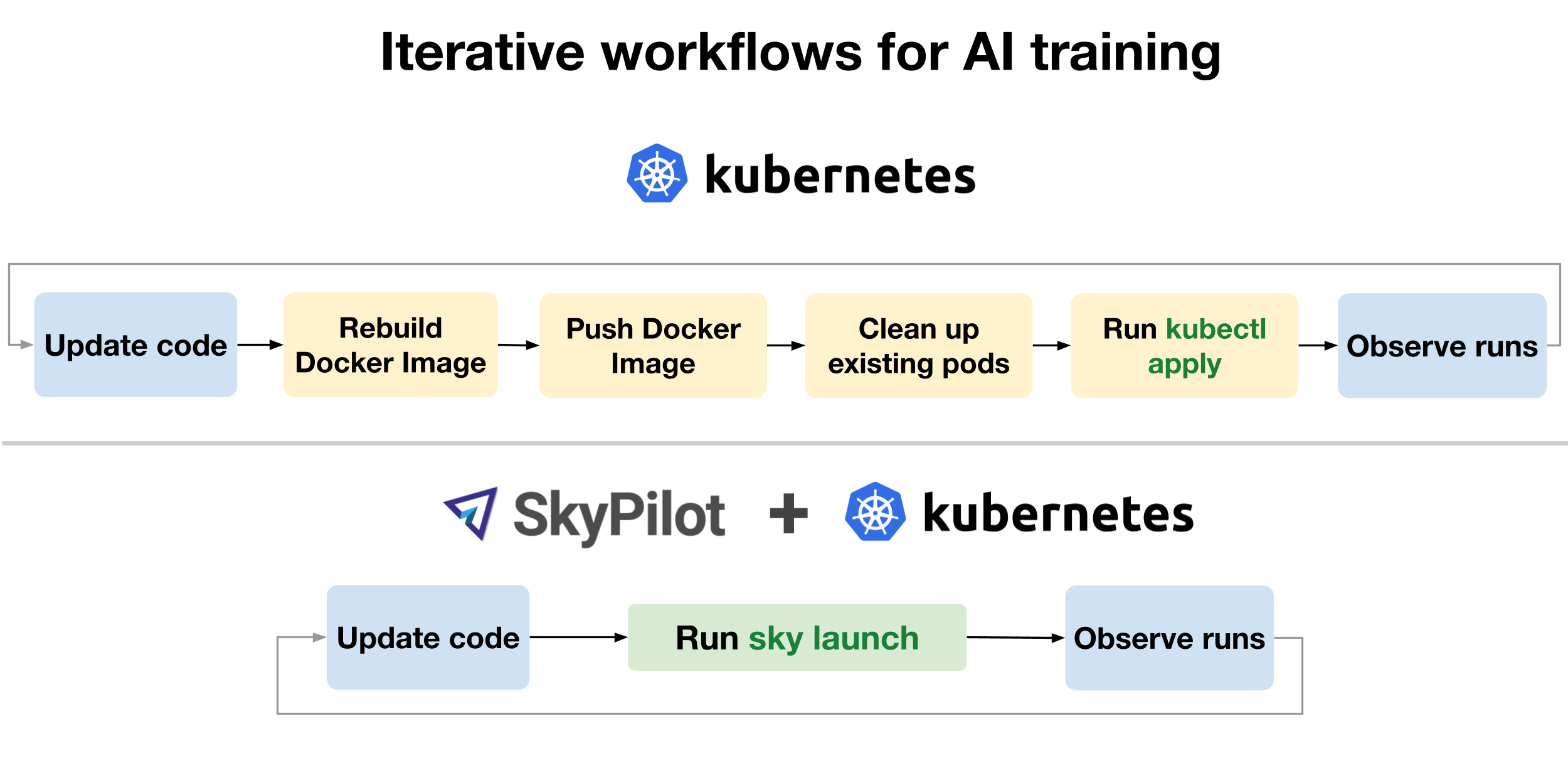
SkyPilot: Slurm-like simplicity on Kubernetes
SkyPilot is an open-source framework for running AI workloads on any infrastructure. It supports cloud VMs (AWS, GCP, Azure, and many more), Kubernetes clusters, and Slurm clusters. The key insight is that it provides a unified interface across all of these backends while preserving the simplicity that made Slurm pleasant to use.

For teams migrating from Slurm to Kubernetes, SkyPilot brings the Slurm-like workflow you know to K8s, without sacrificing the benefits K8s provides. You get to keep your simple task definitions and interactive development workflow, while your platform team gets the container orchestration and ecosystem integration they want.
How it works
Simple Slurm-like YAML instead of K8s manifests
Remember that 60+ line Kubernetes Job manifest? Here’s the SkyPilot equivalent:
resources:
  accelerators: H100:8
  cpus: 32+
  memory: 256+
  infra: kubernetes

num_nodes: 2

setup: |
  pip install torch transformers

run: |
  torchrun --nproc_per_node=$SKYPILOT_NUM_GPUS_PER_NODE train.py
SkyPilot handles pod creation, resource allocation, container setup, and networking behind the scenes. You just describe what you need.
Interactive development that actually works
Launch a dev cluster and SSH in, just like salloc:
# Launch a cluster with GPUs
$ sky launch -c dev --gpus H100:1

# SSH in
$ ssh dev
This workflow is familiar to ML researchers and engineers: get a GPU node, SSH in (or start a remote dev session in your IDE), iterate on code, run experiments. SkyPilot makes this work on Kubernetes without the port-forwarding gymnastics.

You get K8s benefits too
Running on Kubernetes through SkyPilot means you get:
- Container isolation: Each job runs in its own container with its own dependencies
- Integration with K8s ecosystem: Monitoring, logging, and other K8s tooling work as expected
Porting from Slurm to Kubernetes via SkyPilot
Here’s a side-by-side of a typical distributed training job:
Slurm:
#!/bin/bash
#SBATCH --job-name=train
#SBATCH --nodes=2
#SBATCH --gpus-per-node=8

module load cuda/12.1
source ~/venv/bin/activate

srun torchrun \
  --nproc_per_node=8 \
  --nnodes=$SLURM_NNODES \
  --node_rank=$SLURM_NODEID \
  train.py
SkyPilot:
name: train
num_nodes: 2
resources:
  accelerators: H100:8

setup: |
  uv venv .venv
  source .venv/bin/activate
  uv pip install torch transformers

run: |
  source .venv/bin/activate
  torchrun \
    --nproc_per_node=$SKYPILOT_NUM_GPUS_PER_NODE \
    --nnodes=$SKYPILOT_NUM_NODES \
    --node_rank=$SKYPILOT_NODE_RANK \
    train.py
The structure is similar enough that porting scripts is straightforward. Most slurm concepts map directly to SkyPilot:
| Slurm | SkyPilot | Notes |
|---|---|---|
salloc --gpus=8 | sky launch -c dev --gpus H100:8 | Interactive allocation |
srun python train.py | sky exec dev python train.py | Run on existing cluster |
sbatch script.sh | sky jobs launch task.yaml | Submit batch job |
squeue | sky status / sky jobs queue | View running jobs |
scancel <jobid> | sky down <cluster> / sky jobs cancel <id> | Cancel job |
sinfo | sky show-gpus | View available resources |
Environment variables
Slurm environment variables have SkyPilot equivalents, e.g.:
| Slurm | SkyPilot |
|---|---|
$SLURM_JOB_NODELIST | $SKYPILOT_NODE_IPS |
$SLURM_NNODES | $SKYPILOT_NUM_NODES |
$SLURM_NODEID | $SKYPILOT_NODE_RANK |
$SLURM_GPUS_PER_NODE | $SKYPILOT_NUM_GPUS_PER_NODE |
See the docs for the default environment variables supported by SkyPilot.
What about NFS on Slurm?
One thing to watch: Slurm clusters typically have a shared NFS home directory mounted everywhere. On Kubernetes, this isn’t automatic.
Use SkyPilot Volumes (recommended): SkyPilot Volumes provide high-performance persistent storage (10-100x faster than object storage) optimized for AI workloads. They persist datasets and checkpoints across cluster lifecycles and eliminate repeated data downloads. Create a volume and mount it in your tasks:
# Create volume (one-time)
$ sky volumes create my-data-volume --size 100

# Use in task
volumes:
  /mnt/data: my-data-volume
Volumes support persistent storage for long-term data, ephemeral volumes for scratch space, and distributed filesystems for multi-node training with concurrent access.
You can also mount existing NFS volumes, use cloud buckets like S3, or sync local code with workdir.
What else changes?
The sections above cover the core workflow, but a few Slurm features don’t have direct equivalents on K8s yet:
Multi-partition / multi-cluster routing. Slurm partitions let admins carve a cluster into hardware pools (e.g., debug, batch, priority) with different limits and priorities. On Kubernetes, you can configure multiple K8s contexts and select one via --infra, but there’s no single scheduler that spans partitions the way Slurm does. On the Slurm side, SkyPilot can already manage multiple Slurm clusters as a unified resource pool with automatic failover - we’ll cover this in detail in an upcoming post on managing multiple Slurm clusters with SkyPilot.
Fair-share and QOS policies. Slurm’s built-in fair-share scheduler and QOS tiers give admins fine-grained control over who gets resources and when. On K8s, Kueue covers many similar features.
Tips for a smooth transition
Start with dev workflows. Get comfortable with sky launch -c dev for interactive work before migrating batch training jobs. The feedback loop is faster, so you’ll get a hang of everything quickly.
Go incremental. You don’t have to migrate everything at once. SkyPilot can coexist with existing Slurm usage. Try it on one project first, validate the workflow, then gradually migrate other workloads.
Use the dashboard. SkyPilot has a web UI (sky dashboard) that shows all your clusters and jobs. It’s useful for getting a unified view of your K8s resources and running workloads. See demo.skypilot.co for a live demo.

Check GPU availability first. sky show-gpus --infra k8s shows what’s available on your K8s cluster. Run it before launching jobs to understand resource availability.
$ sky show-gpus --infra k8s
Kubernetes GPUs
GPU   REQUESTABLE_QTY_PER_NODE  UTILIZATION
L4    1, 2, 4                   12 of 12 free
H100  1, 2, 4, 8                16 of 16 free

Kubernetes per node GPU availability
NODE                       GPU       UTILIZATION
my-cluster-0               L4        4 of 4 free
my-cluster-1               L4        4 of 4 free
my-cluster-2               L4        2 of 2 free
my-cluster-3               L4        2 of 2 free
my-cluster-4               H100      8 of 8 free
my-cluster-5               H100      8 of 8 free
Wrapping up
Both Slurm and Kubernetes have real strengths (for a detailed comparison, see Slurm vs Kubernetes for AI Infrastructure). Slurm offers simplicity and HPC-focused features, while Kubernetes provides container orchestration and ecosystem integration. The question isn’t which is “better”, it’s whether you should have to choose between simplicity and modern infrastructure.
SkyPilot’s proposition is that you shouldn’t. When moving from Slurm to Kubernetes, you should be able to keep the workflow you know while gaining the benefits your platform team needs. You should write a simple task definition, launch it, and focus on your research, not on learning container orchestration.
If you’re facing a K8s migration and dreading the learning curve, give SkyPilot a try. The quickstart takes about 5 minutes, and the Kubernetes setup guide will walk you through connecting to your cluster.