
TL;DR:
- Caching enables high performance object-store access by off-loading to local disk.
- Caches must be optimized for different storage workloads for maximum performance.
- We introduce pre-tuned parameters for common AI workloads and access patterns.
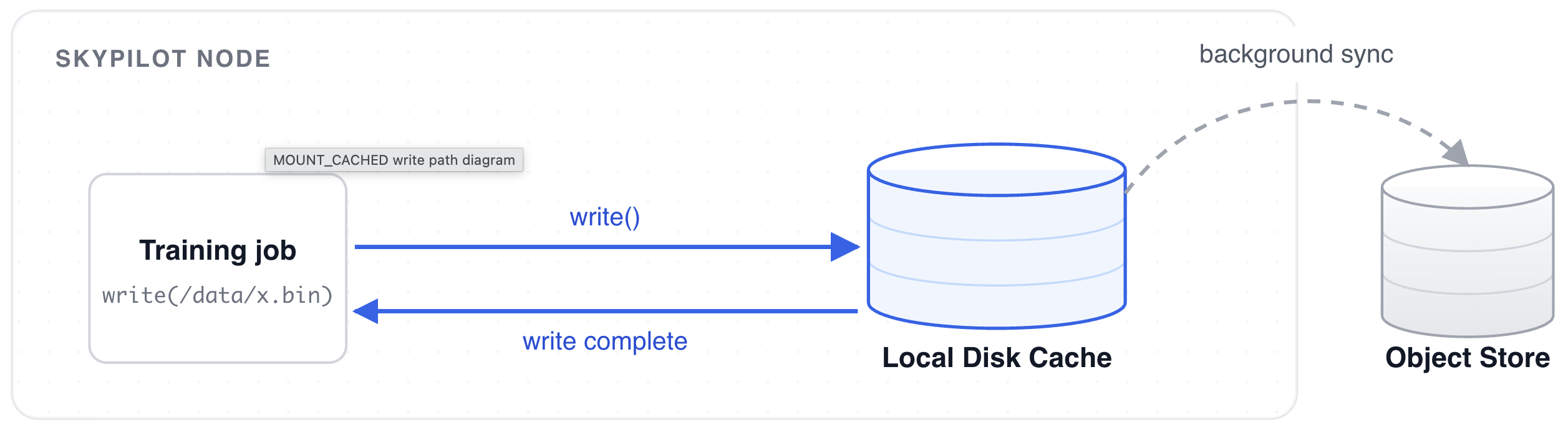
Last April, we wrote about high performance checkpointing and introduced the MOUNT_CACHED storage mode. The idea behind it is simple: buffer checkpoint writes to a local cache and upload to the underlying cloud storage asynchronously.
The local cache was definitely helpful for checkpoints. In similar spirit, would caching be good for workloads other than checkpoint writing?
The naive answer seems like an easy yes, especially considering that caches are normally used to speed up data reads. Turns out, we need to tune the cache differently for different AI storage workloads. After all, storage requirements for model loading and dataset reading, for instance, are vastly different. Tuning the storage system is necessary, but time consuming. So, we put on our gloves and did the heavy lifting for you.
Background: AI Storage Workloads and the Importance of Caching
There are three distinct storage workloads in the model training phase that touch on each part of the training lifecycle:
- Model (Checkpoint) Loading: whether loading a base model or recovering from a checkpoint, the CPU needs to read a large static artifact to be loaded to GPU memory.
- Training Data Loading: while training, the data loaders need to randomly access a large volume of relatively small files.
- Checkpoint Writing: to accommodate for various failures, frameworks will routinely checkpoint the current state of training. These are bursty writes that happen in parallel across GPU ranks.
For a lot of SkyPilot users, model weights, datasets, and checkpoints live on the cloud, more specifically in object stores like AWS S3 and GCP GCS. This becomes a bottleneck – IO operations to object stores are inevitably slower compared to operations to the local filesystem.
How SkyPilot’s MOUNT_CACHED Mode Works
To tackle this problem, MOUNT_CACHED was introduced and added a caching layer that buffer writes to external object stores, enabling incredible checkpoint write performance. The same caching layer also has the potential to be beneficial for read operations like data loading, as a dataset is typically iterated over multiple times during training.
Configurations to Tune MOUNT_CACHED Mode
We recently shipped improvements in SkyPilot to expose configurations to tune MOUNT_CACHED mode, giving users a great degree of freedom to optimize object store mounts. Here is an exhaustive list of what is currently available:
transfers: number of files to concurrently sync to the backing object store.buffer_size: in-memory buffer size for files.vfs_cache_max_size: maximum cache size for the storage mount.vfs_cache_max_age: cache eviction timeout.vfs_read_ahead: read-ahead for each request (for sequential reads).vfs_read_chunk_streams: number of parallel streams that read a file.vfs_read_chunk_size: chunk size for each read on a file.vfs_write_back: delay before syncing files to the backing object store.read_only: mount object store as a read-only filesystem.
Configuring these parameters require minimal changes to the SkyPilot YAML:
file_mounts:
  /dataset:
    source: s3://my-data-bucket
    mode: MOUNT_CACHED
    config:
      mount_cached:
        read_only: True
With these new parameters, we decided to run a series of benchmarks to find out which parameter values were useful for various AI workloads.
AI Storage Workload Benchmarks
We used two standard benchmarks for model loading and training-data loading workloads, each aligned to the access pattern of its target workload.
Model loading was measured with FIO sequential reads across three representative layouts: one 500 GB file (a worst-case single-tensor checkpoint), eight 100 GB shards (assuming a model was fully trained on an eight-GPU node), and a 96-shard 5GB safetensors layout (standard HuggingFace production weights).
Training-data loading was measured with the standard MLPerf Storage benchmark which simulates realistic training loops. We used the ResNet-50 dataset that is available as part of the MLPerf Storage benchmark suite.
We swept MOUNT_CACHED mode’s new parameters across both workloads, running over 1000 benchmarks in total, orchestrated as SkyPilot managed jobs.
Speeding Up Model Loading
The default setting for MOUNT_CACHED optimizes for dataset reading, not model loading. Running the MLPerf Storage benchmark suite gives a read bandwidth of around 1040 MB/s and a sample throughput of 9510 samples/s.
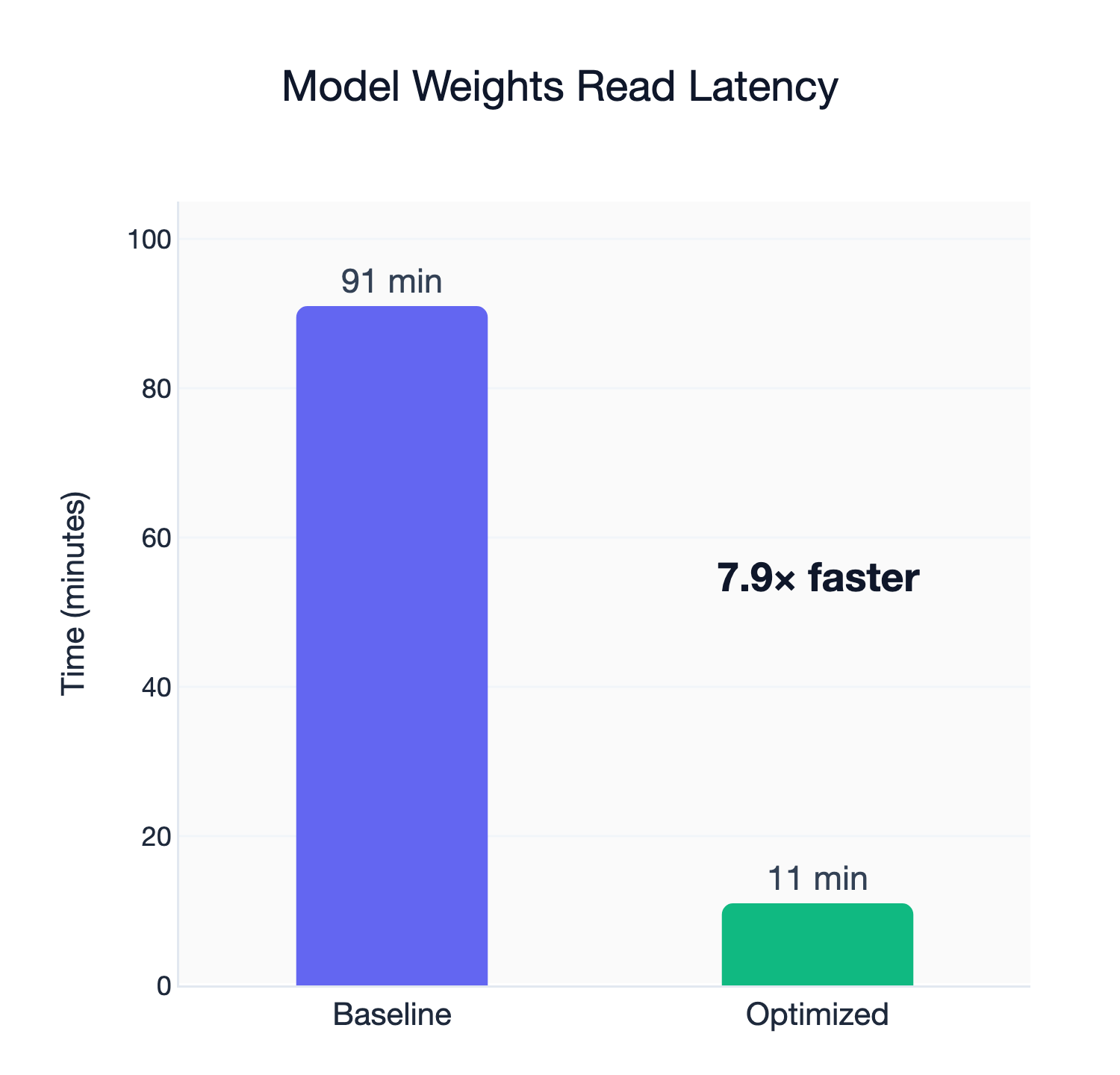
Testing model loading for a frontier model (Qwen3-235B-A22B, BF16 version, which is 500GB), however, reveals that the default configuration only delivers a read bandwidth of around 95 MB/s, a near 11x degradation. Just loading the model would take an eye-watering hour and 30 minutes.
We ran the same benchmarks using different parameter permutations for MOUNT_CACHED and got significant load speed improvements:
| Workload | Baseline | Optimized | Improvement |
|---|---|---|---|
| 500GB x 1 | 95.97 MB/s | 648.17 MB/s | 6.75x |
| 100GB x 8 | 93.94 MB/s | 649.97 MB/s | 6.92x |
| 5GB x 96 | 87.43 MB/s | 690.14 MB/s | 7.89x |
The secrets lie in vfs_read_chunk_streams and vfs_read_chunk_size, which are per-file read parallelism and stream chunk size, respectively. Conceptually, such improvements make sense. Model weights consist of relatively large files, so increasing per-file read parallelism and chunk sizes for each stream will all help benefit read latency. Best of all, the improvements were agnostic to the weight format – whether the model is stored as a single, large file or multiple shards, performance improved drastically from the original implementation.
Model loading still has lower read bandwidth than dataset reading, however, mostly because modern data loaders use many concurrent workers to read data and are able to take advantage of network bandwidth much more effectively.
Training Data Are Not Model Weights
Just to make sure, we tried to use the tuned configuration to read datasets. Perhaps unsurprisingly, the optimizations for model loading were abysmal for dataset reading. The main culprit was vfs_read_chunk_streams, which makes sense: considering that individual files in a training dataset are relatively small, multiple read streams will only create more overhead.
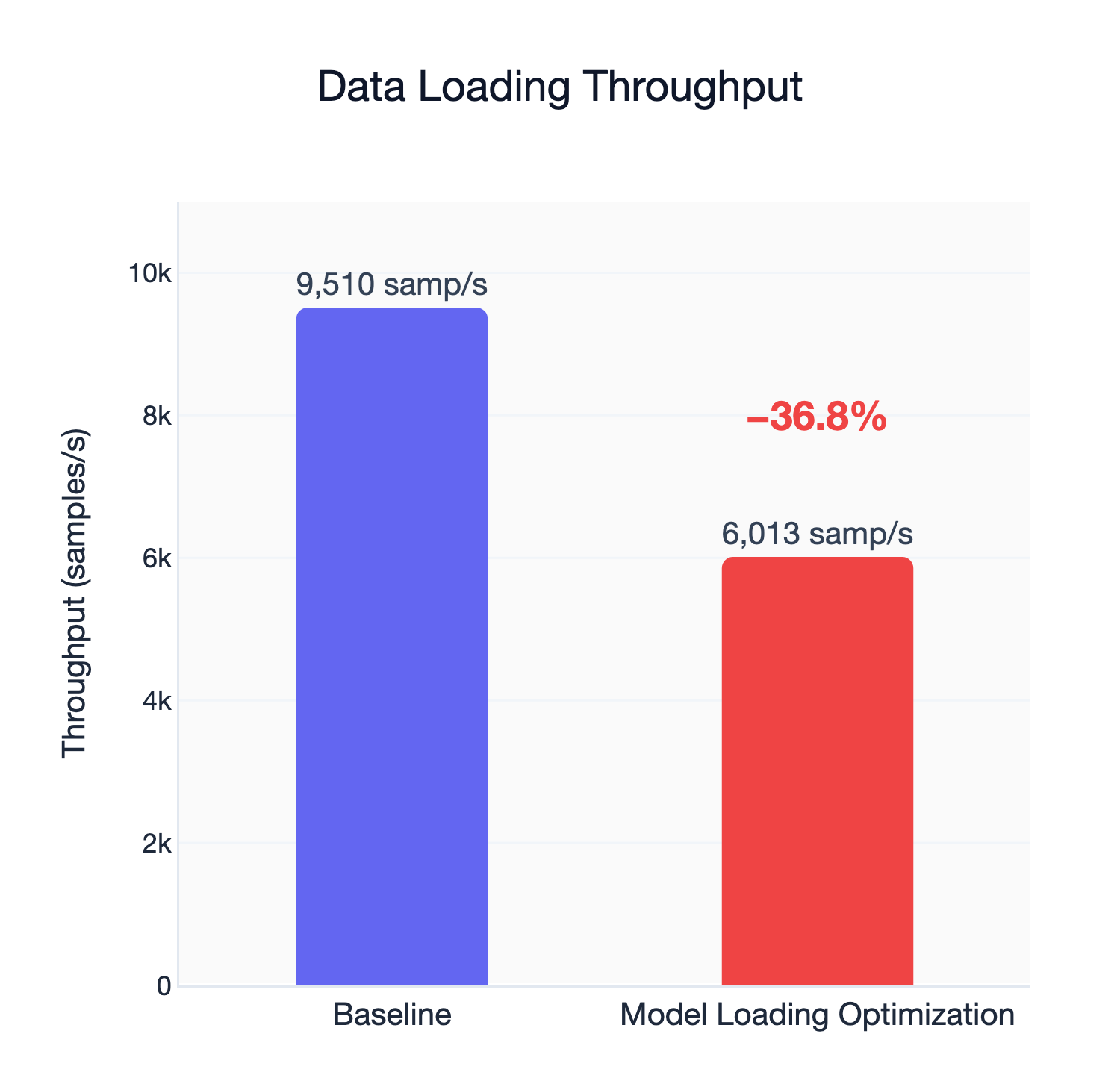
This was an important reminder that caches must be tuned for different workloads for optimal results.
Introducing MOUNT_CACHED Workload Types
To make it easier for SkyPilot users to tune MOUNT_CACHED storage, we bundled the best parameters into named presets as workload types. Currently, we have four presets available:
MODEL_CHECKPOINT_ROMODEL_CHECKPOINT_RWDATASET_RODATASET_RW
The two _RO modes are read-only mount options. This will come in handy when you want to prevent accidental overwrites to, for instance, the training dataset.
Using the presets is a one-line change in your SkyPilot YAML:
file_mounts:
  /model:
    source: s3://my-model-weight-bucket
    mode: MOUNT_CACHED
    type: MODEL_CHECKPOINT_RO
Tips and Tricks
We found some other interesting optimization tricks from our experiments that aren’t related to MOUNT_CACHED tuning but have significant implications in practice.
Tip #1: Use different buckets for training data and model weights
It is obvious that tuning for model weights and training data is not just different, but the opposite. Separating buckets for data and the model allows you to specify the optimal configuration for each workload.
Tip #2: Size your cache to the working set
Cache size is the one thing we cannot tune for you. SkyPilot is data and model agnostic – SkyPilot has no prior information about your workload. To take advantage of MOUNT_CACHED’s cache, specify a max cache size of your predicted model/data size.
file_mounts:
  /dataset:
    source: s3://my-data-bucket
    mode: MOUNT_CACHED
    type: DATASET_RO
    config:
      mount_cached:
        vfs_cache_max_size: 100G
Conclusion
The storage MOUNT_CACHED mode started as a way to remove the checkpoint bottleneck. A year later, we realized that it was essential to make it performative for all kinds of workloads, and it is, once it’s tuned. SkyPilot’s new workload type option hyper-optimizes MOUNT_CACHED for all kinds of machine learning storage workloads with a simple config.
# Install via: pip install ‘skypilot[kubernetes]’

resources:
    accelerators: H100:8
    disk_tier: best

workdir: .

file_mounts:
    /model:
        source: s3://my-model-weight-bucket
        mode: MOUNT_CACHED
        type: MODEL_CHECKPOINT_RW
    /dataset:
        source: s3://my-data-bucket
        mode: MOUNT_CACHED
        type: DATASET_RO

run: |
    python train.py --model /model/my-model --data /data/my-dataset
Next Steps
- Refer to our docs to learn more about tuning
MOUNT_CACHEDand workload types.